Darkening Wreckwing without losing the blasts
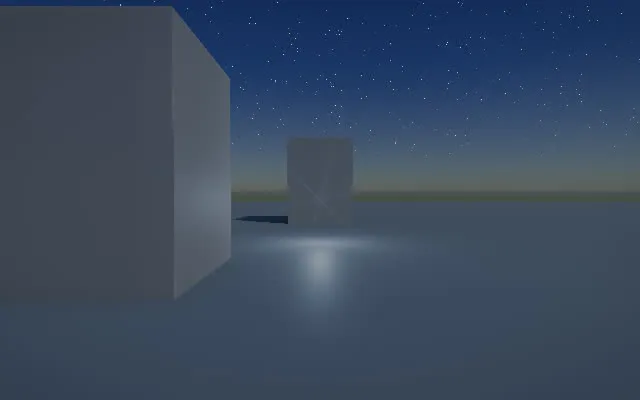
Wreckwing got a new look this week: darker, with crushed blacks, a tint and film grain, for a grimmer and tenser feel. Shaded streets are deep, and the city feels heavier. A dark look has costs, though. It made the biggest moment in a fight, an enemy ship’s fusion core going up, feel smaller, and it showed up a flaw in how the game draws worn edges.
Building the look from filters
The look is a set of filters applied after the scene is lit:
- Darkness lowers the midtones and leaves black and white where they are.
- Black crush pulls dark tones toward black.
- Contrast and Color set contrast and saturation.
- Tint colors the shade and the light: Cold steel, Sodium, Rust or Bruise.
- Vignette darkens the corners, and film grain, new each frame, is strongest in the midtones.
- Haze thickens the fog up to five times, and Bloom spreads bright light up to 3.5 times.
- Edge softening and edge wear work on the edges between faces. Trilithon Engine builds the city from convex pieces, and their edges can look too sharp. Softening blends those pixels toward their neighbors. Wear adds grime to inside corners and pale wear to outside edges.
The edges come from depth. Across a flat face, depth changes at an even rate on the screen, so its second difference is zero there and not where two faces meet or at a silhouette.
The game now starts with Black crush on Heavy, Color at 50%, the Rust tint, a medium vignette and grain, smoggy haze, much more bloom, soft edges and heavy wear. Darkness is off.
Softening the black crush
The first black crush was a hard clip: everything under a threshold went to black, and the deepest shade became unreadable. It is now a soft toe. A display value g becomes g²(1 + k)/(g + k), darker the darker it was and black only at black. On Heavy, a pixel at 10% brightness stays at 5.5% where the clip took it to 2%, and one at 5% stays at 1.8% where the clip took it to black.
Finding why big blasts felt small
A screen can’t show anything brighter than white. Games sell a bright flash with what the eye does: after a flash the eye adapts, so the world looks dim for a moment. Wreckwing already did this. A big flash near the camera dimmed the picture by up to a third at once, and it recovered over about a second.
The new look made that backfire. The dim came at the same moment as the flash, and the black crush took the dimmed street down with it. So the moment of the blast was darker than the moment before it.
Flaring first, then letting the eye adapt
Now a big blast in view gets a flare before the eye adapts. For about a twentieth of a second the picture brightens by up to 80%, the crush and the darkening let go, and the vignette drops by 70%. Then everything eases back over about a third of a second, and only then does the old dim take over.
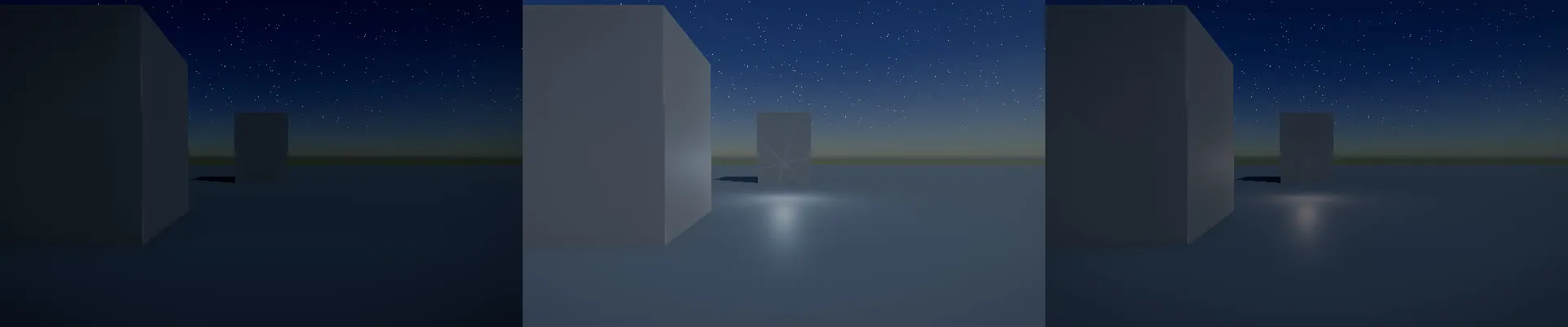
How much flare a blast gets depends on three things:
- How big it is. Every fusion core gets the full flare. A missile gets none, since there are many of them and a flare for each would wear the effect out.
- Where it is on screen. A blast in the middle half of the view counts fully. One near the edge counts less, and one behind the camera not at all.
- How near it is. It counts fully within eight times the blast’s own size.
In the test scene, a core 40 m ahead at night lifts a shaded street far from the blast from 29 to 67 on a scale of 255. The same core behind the camera changes nothing.
Limiting the flare to one flash at a time
A flash that lights the whole screen is a photosensitivity concern. The guideline games follow, WCAG 2.3.1, allows no more than three flashes a second over more than a quarter of any 10-degree part of the viewer’s field of view, about 2.8% of a 1024 by 768 screen, and a dogfight can set off several cores in a second. So a new flare can start at most once every half second, and a blast held back by that limit never starts one later. The first version let the fading tail of a held-back blast start a flare of its own, and a test that sets off a chain of cores caught it.
The flash audit described in Visualizing pressure when a fusion core blows checks every new flash. A worst-case chain of four cores at the strongest setting, three of them within a third of a second, makes no more than one flash a second over WCAG’s area. At the strongest damage setting, a stream of rounds through a broken shield made a hurt ship’s view flash four times a second over that area. Since October 18, its glitches, the color split and the camera’s kick on each hit share one budget of three flash starts a second, and the view now passes on W3C’s reference screen at every strength audited. The game’s Reduce flashes setting turns the flare off.
Keeping edge wear off the smoke
Edge wear finds creases from the depth of the nearest surface at each pixel. Smoke and dust write no depth, so over a pile of debris seen through smoke, the wear drew its lines on top of the smoke and the debris looked cel-shaded, like a cartoon.
The smoke is drawn in a pass of its own, and that pass records how much smoke covers each pixel. The edge pass now reads it and fades the wear by that much. In the test, wear under a thick cloud in front of a block’s corner changed 88 of the 90 pixels it changes in clear air before the fix, and none after.
Seeing ships in the dark
A darker city makes enemy ships harder to see, most of all at night. A far hull came out as dark as the street behind it, and smoggy haze fogged a ship at 250 m by 62%. Enemy ships now carry a red glow at each side of the hull and a dimmer one atop the tail. It is a few pixels across at any distance, brighter the farther the ship is, and at full strength at night and golden hour and a quarter of it by day. At night, a dark Raven-sized target’s contrast against what is behind it rises from 0.09 to 0.40 at 250 m and from 0.20 to 0.38 at 100 m.
Showing damage on the screen
The look also carries the player’s damage. Every hit swells the film grain for about a second, more with the shield down. A hit that gets past the shield glitches the view like a failing drone camera: thin bands slide sideways, colors split, blocks freeze, and a large hit tears the picture. Between hits the view keeps glitching, more often the more damage the hull has taken, and never on an undamaged ship. Reduce flashes keeps the glitches at a quarter and never tears the view, and a hurt ship under fire passes the flash audit as described above.
All of this is in the development build as of October 17, the fix to a hurt ship’s view as of October 18, and none of it is in a tagged release yet.
Updated 2026-10-18: WCAG 2.3.1's flash area corrected from about 11% of the screen to about 2.8%. A hurt ship's view failed at the strongest setting at that area until a fix on October 18.
How this post was made
- Drafted by
- A Claude Code session in the trilithon.games repository, October 17, 2026, working from the game's dev journal, changelog, commits and tracker.
- What it did
- Drafted this post from the game session's journal entry of October 17, added the look's filters, the softer black crush, the enemy lights and the hurt ship's view from the changelog, and checked each number against the changelog and the commit messages.
- Reviewed by
- Alex van Rossum,
On the roadmap: A more realistic look
Linear MIP2-867, MIP2-978, MIP2-961, MIP2-962commits 5bb3a80, 9f05baf, 42164c0, 0bab9e2, 077fa24, 459edfd